Prepare your folder
Choose a few clips and keep them together with any music or images. Decide what the video should show before you start editing.
Meet OpenShot
Take a small idea from a folder of clips to a finished video. OpenShot gives you a free desktop editor to begin with.
Free & open sourceWindows · Mac · Linux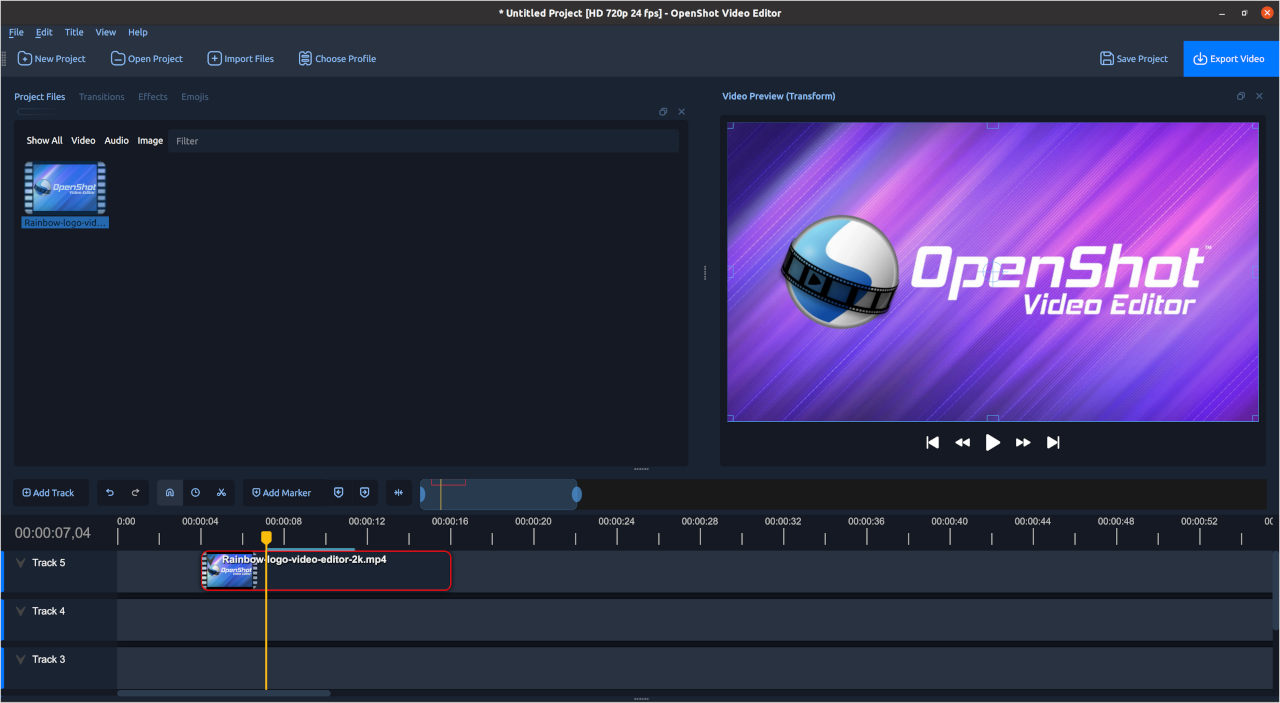
Get to know the workspace
Bring video, sound, and images into a timeline. Explore titles and transitions as your project takes shape.
Explore the official feature guideStart small. Finish something.
Choose a few clips and keep them together with any music or images. Decide what the video should show before you start editing.
Build a rough sequence. Trim repetition and check that the opening gives the viewer enough context.
Play the resulting video file. Check the sound and titles, then return to the project to make any changes.
Need detailed instructions? Follow the official OpenShot user guide.
Before you press export
Look for a missing step or an unexplained jump. Remove a clip if it repeats information the audience already has.
Listen through headphones and speakers. Background music should leave room for any voice you want people to understand.
Check spelling, contrast, and timing. Use the smallest likely viewing screen as a useful reality check.
Available on your desktop
See the free installer and optional Store version.
Official download optionsReview the available Mac build and requirements.
Official download optionsFind the current package and setup instructions.
Official download optionsGood to know
Free downloads are available from openshot.org. A paid Microsoft Store option also supports development. Check the official download page for the current choices.
OpenShot offers desktop versions for Windows, macOS, and Linux. Review the current build and installation requirements for your computer.
No. The buttons open the official OpenShot download page, where you choose the appropriate version and follow the installation instructions.
Use the official OpenShot user guide and support resources. This independent page introduces the workflow and does not provide software support.
Choose your download, explore the workspace, and take your first idea all the way to a finished file.
Continue to openshot.org